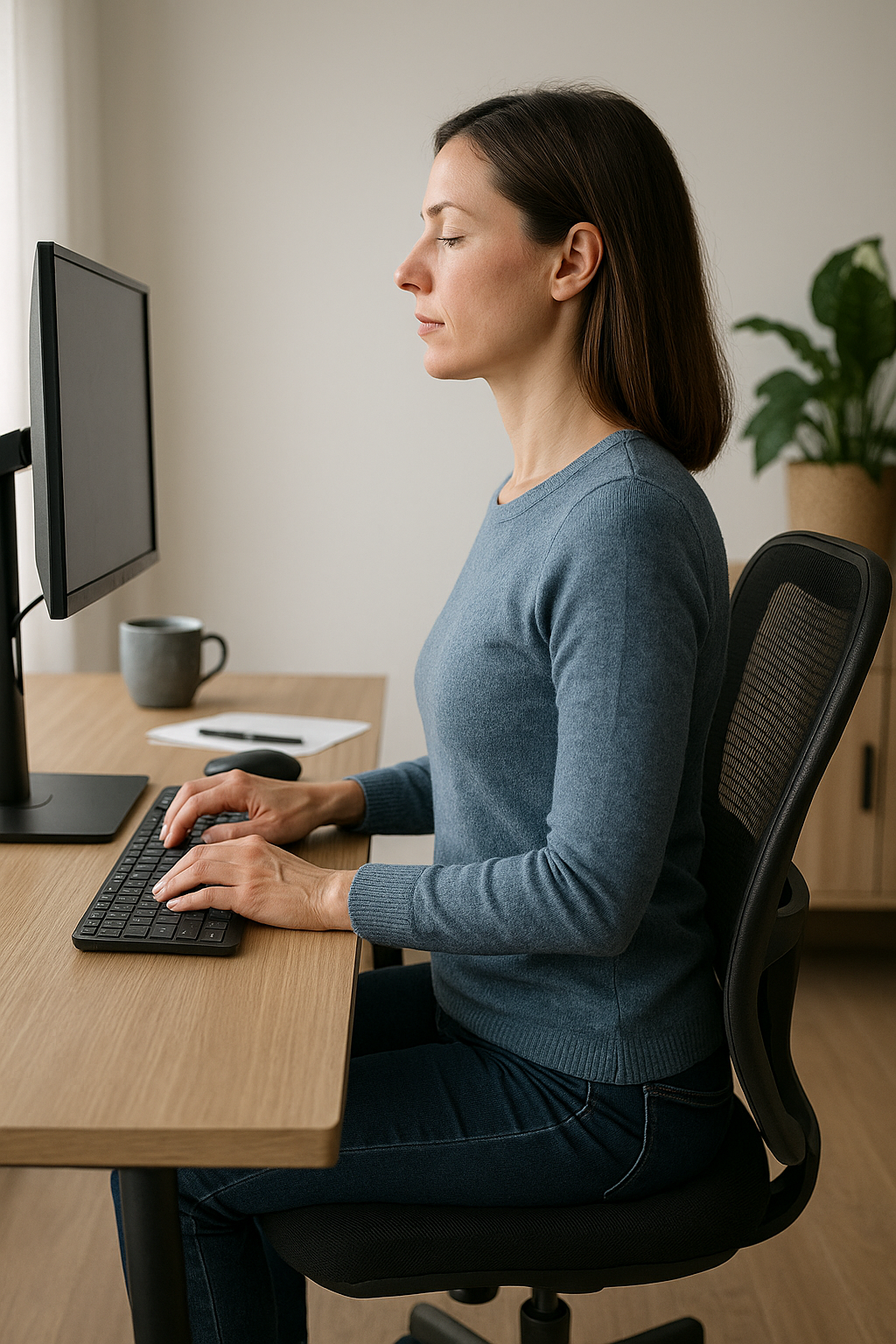


If your workday happens mostly from a chair, your posture is working overtime. The way you sit can quietly shape how your back feels at 3 p.m., how tense your shoulders get during meetings, and even how much energy you have left when you close the laptop. And because sitting is so automatic, it’s easy to drift into a position that feels “fine” in the moment—until it doesn’t.
That’s where correct sitting position comes in. It’s not about sitting bolt upright like a statue or forcing your shoulders back until you feel stiff. It’s about finding a balanced, sustainable alignment where your spine can keep its natural curves, your muscles don’t have to fight gravity all day, and your body gets the support it needs to stay comfortable and alert.
The challenge is that modern desk life nudges us in the opposite direction: screens pull the head forward, long hours encourage slouching, and stress often shows up as raised shoulders and shallow breathing. Even with a decent chair, small habits—like crossing your legs or perching on the edge of the seat—can gradually load the lower back and neck in ways you’ll notice later.
Why correct sitting position matters more than you think
When you sit with your pelvis stacked under your shoulders and your spine in a neutral, natural “S-shape,” your body can distribute pressure more evenly. That often means less strain in the lower back, fewer tight traps in the shoulders, and a neck that isn’t constantly craning toward the screen. Many people also notice they feel less fatigued, because they’re not using extra effort just to hold themselves up.
Just as importantly, good sitting posture can make desk work feel smoother. When your arms are supported and your head is balanced over your torso, it’s easier to type, use a mouse, and focus—without that creeping discomfort that steals attention.
A realistic approach: comfort, not perfection
There isn’t one “perfect” pose you must maintain all day. The goal is to set yourself up in a strong default position you can return to, then change it regularly. In the next sections, we’ll break down what correct sitting position actually looks like from feet to head, how to adjust your workstation to match your body, and how small movement breaks can make a big difference over time.
What correct sitting position looks like from the ground up
A solid sitting posture starts with alignment, not effort. Think of your body as a stack: when the base is stable, the rest of you can relax into position instead of constantly “holding” yourself upright. The goal is to keep your spine close to its natural curves while distributing pressure evenly through the pelvis and backrest.
Spine and pelvis: find neutral, then support it
Your pelvis is the foundation of your spine. When you perch on the edge of the chair or tuck your tailbone under, the lower back often flattens and the upper back compensates by rounding. Instead, slide your hips all the way back so your bottom is close to the backrest. Aim to sit on your sit bones (the bony points you can feel under your pelvis) with your ribcage stacked over your pelvis.
In a correct sitting position, your lower back keeps a gentle inward curve. Many chairs don’t match that curve perfectly, so a small lumbar support (built-in support, a cushion, or a rolled towel) can help fill the gap and reduce the urge to slump. A useful cue is to imagine your spine “lengthening” upward while your shoulders stay heavy and relaxed.

Lumbar support belt
Adjustable support belt for lower back, ideal for relieving pain and tension while sitting or being active.
Hips, knees and ankles: use the 90–90–90 guideline
A simple way to check your lower-body alignment is the 90–90–90 principle: hips, knees and ankles are each bent at roughly 90 degrees. Your thighs should be mostly parallel to the floor, with your knees roughly in line with (or slightly lower than) your hips. If your chair is too high, you’ll tend to point your toes or let your legs dangle; if it’s too low, your hips may drop below your knees and encourage slouching.
Also check the space behind your knees: you want a small gap between the edge of the seat and the back of your knees so circulation isn’t compressed. If the seat pan is too deep, add a cushion behind your back to bring you forward while still staying supported.
Feet: stable and uncrossed
Feet matter more than most people realise. When your feet are flat on the floor (or on a footrest), your pelvis tends to stay more level and your spine has an easier time staying neutral. Try to avoid crossing your legs for long periods, as it can twist the pelvis and encourage asymmetry through the lower back and hips. If you catch yourself doing it out of habit, treat it as a cue that your setup may need adjusting—often a footrest or a slightly different chair height is enough to make “feet down” feel natural.
Shoulders, arms and hands: let support do the work
Upper-body tension often comes from reaching. In a correct sitting position, your elbows stay close to your sides and bend around 90–120 degrees. Your forearms should be roughly parallel to the floor, with wrists in a neutral position (not bent up, down, or angled sharply toward the mouse).
Keep your shoulders relaxed—neither shrugged up nor forced back. If your shoulders creep toward your ears during typing, bring the keyboard and mouse closer, and consider using armrests (set low enough that they support your forearms without pushing your shoulders up). The less you have to “hover” your arms, the less your neck and upper traps have to compensate.
Head and neck: ears over shoulders
Neck strain often starts with the head drifting forward toward the screen. A quick check: your ears should sit roughly over your shoulders, and your chin should feel gently tucked (not jammed down). If you feel like you’re constantly craning, it’s usually a workstation issue rather than a willpower issue—your screen is likely too low, too far away, or off-centre.
Practical workstation ergonomics that make posture easier
Even great body awareness won’t hold up against a poorly set-up desk. Adjust your environment so correct sitting position is the path of least resistance.
- Monitor height: Position the screen so your eyes are level with the top portion of the display. This helps reduce forward head posture.
- Monitor distance: Place the screen about an arm’s length away, then fine-tune based on comfort and text size.
- Keyboard and mouse: Keep them close together and close to your body so your elbows can stay tucked in. Avoid reaching forward with the shoulder.
- Chair and back support: Use the backrest, and add lumbar support if there’s a gap at the lower back.
- Foot support: If your feet don’t rest flat, use a footrest rather than lowering the chair so far that the desk becomes too high.
A quick checklist you can use today
| Pelvis | Sit well back; weight even on both sit bones |
| Lower back | Gentle inward curve supported by chair or lumbar support |
| Hips/knees/ankles | About 90–90–90; thighs mostly parallel to the floor |
| Feet | Flat on floor or footrest; avoid long periods of leg crossing |
| Shoulders/arms | Shoulders relaxed; elbows close; forearms supported if possible |
| Head/neck | Ears over shoulders; chin gently tucked; screen at a comfortable height |
Don’t forget the missing piece: movement
Even the best posture becomes a problem if it’s the only posture you use. Build in small resets: stand up to take a call, roll your shoulders, or walk for a minute every hour. A helpful habit is a 10-second “posture return” each time you hit send on an email: feet grounded, hips back, ribs stacked, shoulders soft, head balanced. Correct sitting position is less about holding still and more about returning to a supportive baseline—again and again throughout the day.
Benefits of correct sitting position
Correct sitting position is often discussed as a way to reduce back pain, but the benefits go further than comfort. When your spine is supported in its natural curves and your joints are stacked in a balanced way, your body can work more efficiently throughout the day.
Less strain, fewer flare-ups
A neutral spine and level pelvis help distribute load through the back and hips instead of concentrating pressure in one area. For many people, that means fewer episodes of stiffness in the lower back, less tension around the neck and shoulders, and less “end-of-day” soreness after long periods at a desk.
More energy and better focus
Slouching often turns sitting into a low-level strength exercise: the body has to fight gravity to keep the head from drifting forward and the torso from collapsing. In a correct sitting position, your chair and workstation provide more of the support, so your muscles can relax. That can translate into less fatigue and an easier time staying focused—especially during tasks that require steady attention.
Easier breathing and a calmer upper body
When the ribcage is stacked over the pelvis and the shoulders are relaxed, the chest has more room to move. Many people notice that upright, supported sitting makes breathing feel less restricted. This matters because shallow, tense breathing often goes hand-in-hand with raised shoulders and a tight neck during stressful work.
Long-term support for spine health
No posture guarantees you will never have pain, and bodies vary. But consistently returning to a balanced sitting setup can reduce repeated stress on the same tissues. Over time, that can support better tolerance for desk work and make it easier to stay active outside of work—because you are not spending your evenings recovering from your chair.
Targeted tips for different everyday needs
Office workers: make the “default” easy
If you work at a computer, the biggest posture problems usually come from reaching and craning. Keep the items you use most (keyboard, mouse, phone) close enough that your elbows can stay near your sides. If you notice you keep leaning forward, treat it as a setup signal: raise the screen, bring it closer, or increase text size so you can stay back against the chair.
If your chair does not support your lower back, add a small lumbar cushion or a rolled towel. The goal is not to push your back into an exaggerated arch, but to gently support the natural inward curve so slumping is less tempting.

Men's Posture Shirt™ - Black
Patented shirt to promote posture, relieve pain and activate muscles during work or leisure.
Children and teens: support the feet first
For homework and screen time, children often sit on chairs that are too high, which leads to dangling legs and a rounded back. Prioritise foot support (a sturdy footrest, box, or step) so hips, knees, and ankles can rest around 90 degrees. A simple rule: if the feet are supported, it becomes much easier for the child to sit back and keep the head from dropping toward the desk.
Older adults: prioritise stability and comfort
For older adults, comfort and stability matter more than forcing a strict posture. Choose a chair height that makes it easy to stand up without rocking forward, and avoid very soft seating that lets the pelvis sink and the upper back round. Armrests can be helpful for reducing shoulder load and assisting with sit-to-stand transitions. If stiffness is an issue, shorter sitting periods with more frequent gentle movement often work better than trying to “hold” one position.
Frequently Asked Questions
What is the best angle for my hips and knees?
A practical guideline is the 90–90–90 setup: hips, knees, and ankles bent at roughly 90 degrees, with thighs mostly parallel to the floor. If anything, it is often helpful for knees to be level with or slightly lower than the hips, as this can make it easier to keep the pelvis neutral and the lower back supported.
Where should my feet be when sitting?
Your feet should be flat on the floor or on a footrest, with weight evenly distributed. If your legs dangle, you are more likely to slide forward or tuck the pelvis under, which can increase strain in the lower back. Long periods of leg crossing can also encourage pelvic twisting and uneven loading.
How high should my monitor be?
As a general rule, position the screen so your eyes naturally land near the top portion of the display when you sit back comfortably. This helps reduce forward head posture and neck strain. Keep the monitor about an arm’s length away, then adjust based on your vision and screen size.
How often should I take breaks from sitting?
Try to avoid long, unbroken sitting. A useful baseline is to stand up and move briefly at least once per hour, and to change position more often if you can. Even short resets—standing, walking to get water, or doing a few shoulder rolls—help reduce stiffness from staying still.
Can ergonomic aids help in maintaining correct posture?
Yes, ergonomic aids can make correct sitting position easier to maintain by reducing the need to “hold” posture with muscle effort alone. Common options include lumbar supports to fill the gap in the lower back, footrests to support the legs when the chair is high, and arm supports to reduce shoulder tension. These tools work best when they support a good setup rather than replacing movement and regular posture changes.
Källor
- "How to Maintain a Good Posture When Sitting." MS Trust.
- "Good Posture Can Be a Health Superpower." ColumbiaDoctors.
- "What Is Good Posture?" Medical News Today.
- "Posture: Benefits, Exercises, and Tips." Healthline.
- "Proper Sitting Posture." Jacksonville Orthopaedic Institute.
- "The Power of Good Posture." Rush University Medical Center.
- "Guide to Optimal Sitting Posture." IPA Physio.
- "Correct Sitting Posture." YouTube.
- "Correct Sitting Posture for Your Student." Develop Learn Grow.
- "How to Improve Posture." University of St. Augustine for Health Sciences.
- "Guide to Good Posture." MedlinePlus.
- "Proper Posture is Important for Good Health." Mayo Clinic Health System.
- "Sitting Position and Posture." Bedfordshire and Luton Children's Health.
- "Posture and How It Affects Your Health." Brown Health.
- "The Art of Sitting." Posturite.
- "Why Good Posture Matters." Harvard Health.
- "Sitting on the Floor: Posture and Health Benefits." Upright Pose.